Your maker files are a mess. We both know it.
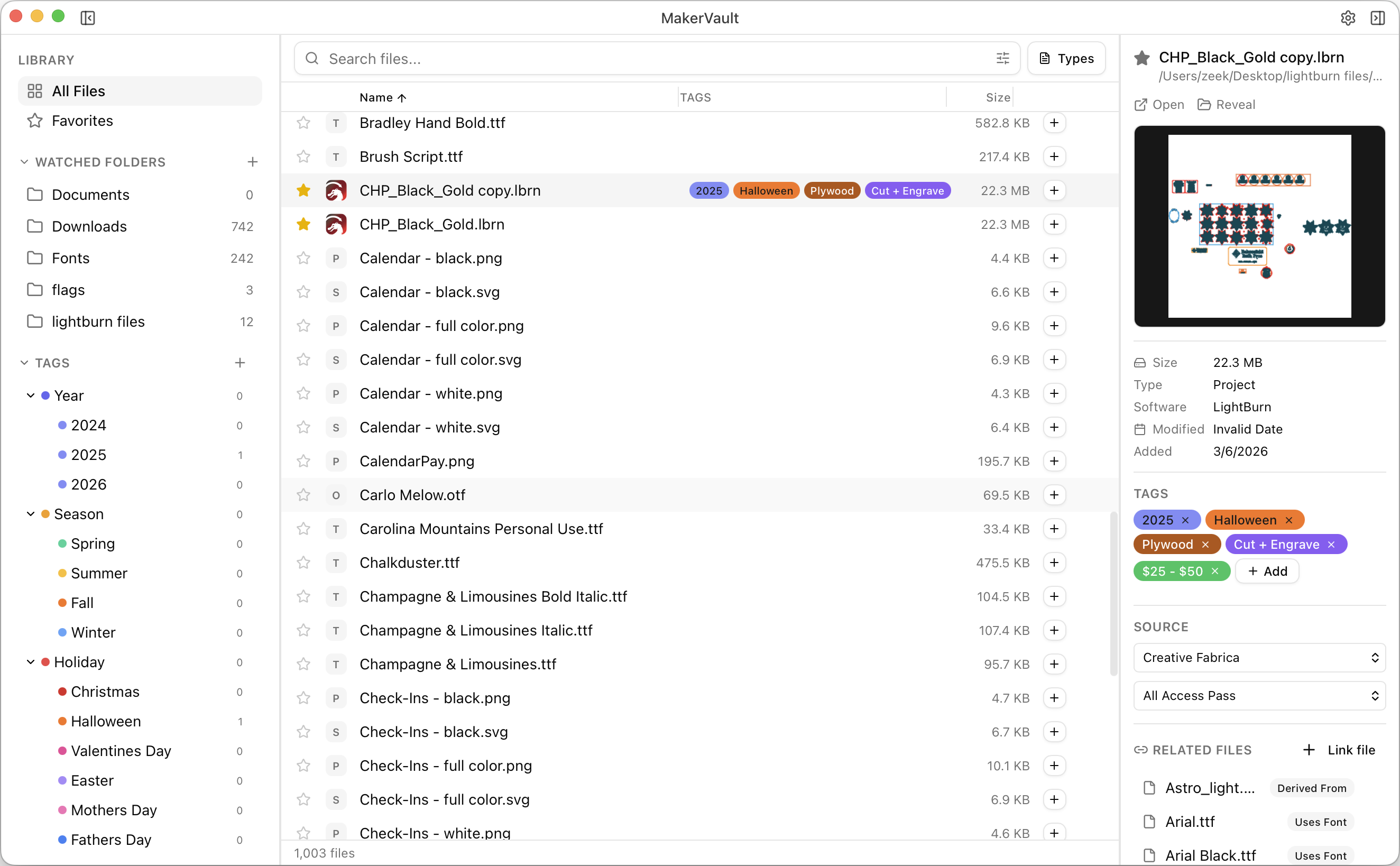
Most makers don't need more files. They need a better way to find the ones they already have. MakerVault gives you a searchable, visual library with previews, tags, cut settings, and font data — without opening a single app.
Local-first. No cloud. No subscription. One-time purchase.
Built for makers who use
You've tried everything. Nothing sticks.
I'd spend 10 minutes digging through folders to find something I knew I had. Renamed files with timestamps. Duplicates everywhere. Folders within folders. I tried naming conventions. I tried "I'll organize everything this weekend." I tried external drives with labels.
Every system fell apart the moment I got busy or bought another bundle.
And I know I'm not the only one. We've talked to hundreds of makers in laser cutting, CNC, and 3D printing communities. The same story comes up every time — thousands of design files, no way to find them, and hours wasted scrolling.
“Everything lives in my downloads folder and when I need something I hope and pray the designer named it something helpful.”
“I sat down a couple nights and spent a few hours organizing, but when I got busy, they all went into folders titled 'to be made' or 'new'.”
“I feel like I have a ton of duplicate files but I'm not sure if they are duplicates.”
MakerVault doesn't ask you to stay organized. It does the organizing for you. Point it at your folders, and your entire library becomes searchable, previewable, and tagged — automatically.
Not just organized. Searchable. Previewable. Understood.
Most file organizers give you a prettier folder view. MakerVault actually reads your files, extracts the data inside them, and turns your scattered collection into a searchable knowledge system.
Find any file in under a second. 50,000 files. Results before you finish typing.
Type a few characters. MakerVault searches across filenames, tags, notes, source URLs — and the actual content inside your files. Search for a customer's name that's engraved in a LightBurn file. Search for a phrase. Search for a font. It finds what folders never could.
Search filenames, tags, notes, and source URLs. Results appear as you type.
Prefix your query with / to search inside file contents — LightBurn text, layer names, cut settings, G-code comments.
Combine search with filters for file type, tags, sources, favorites, and notes. Every filter works together.
See inside every file without opening it. Press spacebar. Full preview — instantly.
LightBurn, xTool, SVG, DXF, STL, 3MF, PDF, PNG, fonts, G-code, and 25+ more. For LightBurn and xTool files, you also see the cut settings, layer info, text elements, and embedded notes. No more opening files one by one just to see what they are.
SVG, DXF, AI, EPS, CDR, STL, 3MF, G-code, LightBurn, xTool, RDWorks, VCarve, PDF, PNG, TTF, OTF, and more.
View cut settings, layer info, text elements, font names, and embedded thumbnails without opening LightBurn.
Bought a bundle with 200 files? MakerVault reads the ZIP and shows every file inside with previews — without extracting to disk.
xTool Creative Space — deep read. See inside your xTool files without opening the app.
MakerVault reads inside xTool Creative Space project files the same way it reads LightBurn. Open a file and instantly see processing parameters, layer settings, material info, and design elements — without launching xTool. Search for anything inside your xTool projects the same way you search everything else.
Speed, power, passes, and engraving settings extracted directly from the file — visible at a glance.
See every layer, its material type, and how it's configured without opening xTool Creative Space.
Prefix your query with / to search inside xTool file contents — find projects by material, setting, or design element.
Tags that actually work. Better than folders. Way better than folders.
Folders force you to put a file in one place. Tags let it live in many. Create up to 3 levels of nested tags — Holiday → Christmas → Ornaments — tag files in bulk, and filter your entire library with one click. Then group files into project builds to record what you actually made.
Create up to 3 levels of tags. Click a parent tag to filter by everything underneath it.
Select multiple files with Cmd+click or Shift+click to tag, assign a source, or set a machine profile — all at once.
Group design files into a project. Record which machine and material you used, attach finished-work photos, and track status from idea to complete.
MakerVault indexes every font used in your LightBurn files. Click a font name and see every project that uses it.
Your files never leave your computer. No cloud. No account. No internet required after activation.
MakerVault runs entirely on your machine and watches your folders for changes in real time. Track where every file came from, link related files together, and find true duplicates by content hash — not just filename. One-time purchase. You buy it, you own it. Let's be real — we have enough subscriptions already.
Track where files came from — Etsy, Creative Fabrica, Design Bundles, or your own designs. Paste a URL and the source is auto-detected.
Content hashing — not filename matching. Finds real duplicates even if renamed or saved to different folders.
New, modified, and deleted files are detected automatically across all your watched folders. No manual re-scan.
Built by a maker who needed this to exist.
I own an Aeon Mira 7, a CNC, and a 3D printer. For a while I ran an actual laser engraving business. Now it's mostly personalized gifts for friends and family. But whether it was a business or a hobby, the problem was the same — thousands of design files across multiple machines, and no real system for finding any of them.
I tried everything. Naming conventions. Folder structures. "I'll organize it this weekend." Nothing stuck. So I built the tool I wished existed.
MakerVault has been running on my own machines, organizing my own library. Now I'm opening it up to 100 makers who want to stop wasting time looking for files they already own.
— Zeek
100 early access spots. That's it.
Claim your spot before they're gone.
You'll get the app before anyone else, direct access to give feedback, and early pricing that won't come back.
Frequently asked questions
Everything you need to know about MakerVault.